• TRENDING
  • The Skywalker Saga
  • Elden Ring Boss
  • Sonic Frontiers PS 5
  • Deathloop Gameplay
  • CONTACT US
SUBSCRIBE
The Gamer Sanctuary
  • Home
  • Games
    • Pokemon go
    • Fortnite
    • Fisch
    • Honkai Star Rail
    • Marvel Rivals
    • Minecraft
    • ROBLOX
    • Wordle
    • Valorant
    • NYT Strands
    • NYT Connections
  • Xbox
    Unlocking Fun: Tips and Tricks for Today’s Gaming Challenge – June 3, 2025!
    Games

    Unlocking the Game: Tips, Answers, and Spangram Secrets for June 10, 2025!

    TGS TGS June 10, 2025
    Unlock Today’s Wordle Challenge: Hints and the Answer for #1475 (July 3, 2025)
    Games

    Unlock the Challenge: Wordle Hints and Answer for July 5, 2025!

    TGS July 5, 2025
    Unlocking NYT Connections: Your Guide to Clues and Solutions for May 16, 2025!
    Games

    Mastering NYT Connections: Tips and Answers for May 21, 2025!

    TGS May 21, 2025
  • Bookmarks
Reading: Unlocking Secrets: Master the Player Locator Bar in Minecraft!
Share
The Gamer SanctuaryThe Gamer Sanctuary
Font ResizerAa
  • Adventure
Search
  • Home
    • Home 5
  • Categories
  • Bookmarks
    • My Bookmarks
  • More Foxiz
    • Blog Index
    • Sitemap
Have an existing account? Sign In
Follow US
© Foxiz News Network. Ruby Design Company. All Rights Reserved.
Games

Unlocking Secrets: Master the Player Locator Bar in Minecraft!

TGS
Last updated: May 28, 2025 5:00 am
TGS
Share
4 Min Read
Unlocking Secrets: Master the Player Locator Bar in Minecraft!
SHARE

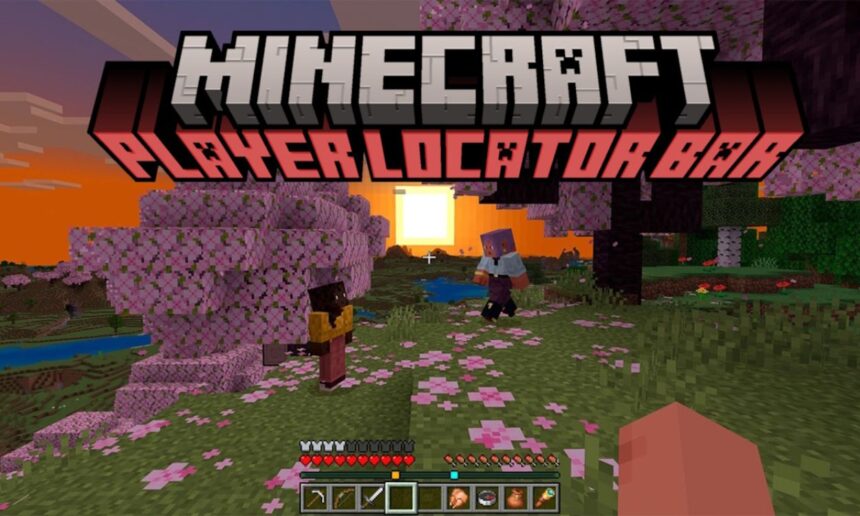
The New Player Locator Bar in Minecraft: A Game-Changer!

Hey there, Minecraft fans! 🎮 Do you ever find yourself wandering around trying to locate your friends in a massive Minecraft world? Well, this is about to change thanks to a cool new feature coming in the Minecraft Summer Drop 2025! Introducing the Player Locator Bar! Let’s break down what this is all about and how you can use it.

What is the Player Locator Bar?

The Player Locator Bar is a handy tool that helps you find your friends in multiplayer mode. Instead of running around like a chicken with its head cut off, you’ll see colorful indicators that show where your friends are located in the game. How cool is that?

How to Enable the Player Locator Bar

You can enable the Player Locator Bar in two different versions of Minecraft—Java and Bedrock. Here’s how:

For Java Edition:

  1. Open the Minecraft Launcher.
  2. Start up the latest snapshot (that’s an early version of the game).
  3. Create a multiplayer world or join a server.
  4. Invite your friends to join!
  5. If you don’t see the locator bar, press the “T” key, and type in this command: /gamerule locatorBar true.

For Bedrock Edition:

  1. Open the Minecraft Launcher and select the latest preview version.
  2. Create a new world and head to the World Customization menu.
  3. Look for the multiplayer tab, and toggle on the locator bar option.
  4. Invite your pals over to your world, and the locator bar will show up!

Quick Tip: If you start a world without enabling it, don’t worry! You can still turn it on using the command in the chat during the game, but you can’t customize it in Bedrock.

How to Use the Player Locator Bar

Once you have the Player Locator Bar activated, it will always show your friends’ locations. But here’s a fun tidbit: it’ll disappear for five seconds whenever you gain experience points (XP). That means while you’re leveling up, you might lose sight of the locator for a moment.

  • The indicators you see are called waypoints, and each will be a different color based on who they represent.
  • The size of the waypoint indicates how far away the player is:
    • Square: 0-179 blocks.
    • Circle: 179-230 blocks.
    • Small Square: 230-281 blocks.
    • Small Circle: More than 281 blocks away.

This makes finding your friends super easy, just like following a map in a treasure hunt!

How to Hide from the Player Locator Bar

Sometimes, you might want a little privacy while digging deep in your secret lair! No worries; here’s how to go stealth mode:

  1. Crouch or Sneak: If you crouch, your waypoint disappears, but you’ll be moving a bit slower.
  2. Wear a Carved Pumpkin or Mob Head: Put on a carved pumpkin to hide your waypoint. It’s a fun look too!
  3. Drink a Potion of Invisibility: This is the best way to stay hidden—no one will see you!

Fun Question for You!

What’s your favorite video game moment where teamwork made everything easier? Share your experiences!

Conclusion

The Player Locator Bar is sure to enhance your Minecraft multiplayer adventures. It’s easy to use and helps you stay connected with your friends like never before. So, gather your crew, try this new feature out, and have a blast crafting and exploring together!

Have you started using the Player Locator Bar? Let us know your thoughts in the comments! Happy mining! 🌟


You Might Also Like

Unlocking the Magic: A Student’s Guide to Finding and Using Enchant Relics in Fisch!

Conquer Adel, the Night Boss: Your Guide to Winning in Elden Ring!

Unlocking the Secrets: How to Find the Kitsune Fruit in Blox Fruits!

Mastering Fisch: Your Ultimate Guide to Catching and Using Nuclear Power!

Unlock Today’s Wordle Challenge! Hints and Answer for #1331 (February 9, 2025)

TAGGED:#Minecraft
Share This Article
Facebook X Email Print
Leave a Comment Leave a Comment

Leave a Reply Cancel reply

Your email address will not be published. Required fields are marked *

New Releases

- Advertisement -
Ad image

Trending Stories

Unlocking NYT Connections: Tips and Answers for May 2, 2025 – Level Up Your Game!
Games

Crack the Code: Hints and Solutions for NYT Connections – May 10, 2025!

May 9, 2025
Crack the Code: Your Ultimate Guide to Wordle #1300 – Tips and Tricks Inside!
Games

Unlock Your Brain: Today’s Wordle Tips and Answers for #1306!

January 14, 2025
Unlock Epic Rides: Motorcycle Mayhem Cheat Codes You Need to Know!
Games

Unlock Epic Rides: Motorcycle Mayhem Cheat Codes You Need to Know!

March 12, 2025
Unlocking Epic Wins: February 2025 Units Battlegrounds Codes You Need to Try!
Games

Unlocking Epic Wins: February 2025 Units Battlegrounds Codes You Need to Try!

February 19, 2025
Level Up Your Garden: Tips to Get Your Pets to Level 50 Super Fast!
Games

Level Up Your Garden: Tips to Get Your Pets to Level 50 Super Fast!

July 13, 2025
Unlocking the Challenge: Your Go-To Guide for NYT Connections on April 2, 2025!
Games

Unlocking NYT Connections: Tips and Answers for April 4, 2025!

April 3, 2025

Always Stay Up to Date

Subscribe to our newsletter to get our newest articles instantly!

Follow US on Social Media

Facebook Youtube Steam Twitch Unity

© 2025 Thegamnersanctuary.net - All Rights Reserved. YS

The Gamer Sanctuary

More from Foxiz

  • Job @FoxizMagazine
  • Privacy Policy
  • Advertise
  • Subscribe
Welcome Back!

Sign in to your account

Username or Email Address
Password

Lost your password?