• TRENDING
  • The Skywalker Saga
  • Elden Ring Boss
  • Sonic Frontiers PS 5
  • Deathloop Gameplay
  • CONTACT US
SUBSCRIBE
The Gamer Sanctuary
  • Home
  • Games
    • Pokemon go
    • Fortnite
    • Fisch
    • Honkai Star Rail
    • Marvel Rivals
    • Minecraft
    • ROBLOX
    • Wordle
    • Valorant
    • NYT Strands
    • NYT Connections
  • Xbox
    Epic Showdown: Sloclap’s Stunning New Game Wins Hearts!
    Games

    Epic Showdown: Sloclap’s Stunning New Game Wins Hearts!

    TGS TGS April 19, 2025
    Game On! Your Ultimate Guide to Winning Hints and Answers for April 3, 2025!
    Games

    Unravel the Challenge: Tips and Tricks for Crushing Today’s Puzzles (April 16, 2025)!

    TGS April 15, 2025
    Unlock Awesome Rewards: A Guide to Valorant Codes & Gift Cards!
    Games

    Unlock Awesome Rewards: A Guide to Valorant Codes & Gift Cards!

    TGS May 31, 2025
  • Bookmarks
Reading: Getting Your Money Back: A Student’s Guide to Refunding Games on Steam!
Share
The Gamer SanctuaryThe Gamer Sanctuary
Font ResizerAa
  • Adventure
Search
  • Home
    • Home 5
  • Categories
  • Bookmarks
    • My Bookmarks
  • More Foxiz
    • Blog Index
    • Sitemap
Have an existing account? Sign In
Follow US
© Foxiz News Network. Ruby Design Company. All Rights Reserved.
Games

Getting Your Money Back: A Student’s Guide to Refunding Games on Steam!

TGS
Last updated: February 15, 2025 4:30 am
TGS
Share
4 Min Read
Getting Your Money Back: A Student’s Guide to Refunding Games on Steam!
SHARE

How to Get a Refund for Your Steam Game: A Simple Guide

Hey there, gamers! If you’re diving into the world of PC gaming, chances are you’ve heard of Steam—a super popular platform for buying and playing games. But what happens if you accidentally buy a game you don’t want? No worries! Steam has your back with a refund system that, while it might look a bit confusing, is actually pretty simple. Let’s break it down step-by-step!

Why Would You Want a Refund?

Sometimes, we buy games out of excitement, but then realize they’re not what we expected. Maybe they’re too hard, or maybe they didn’t meet your expectations. It’s totally okay! Getting a refund means you can get your money back and maybe use it for a game you’ll really enjoy.

Steps to Request a Refund on Steam

If you’ve decided you’re ready to request a refund, follow these easy steps:

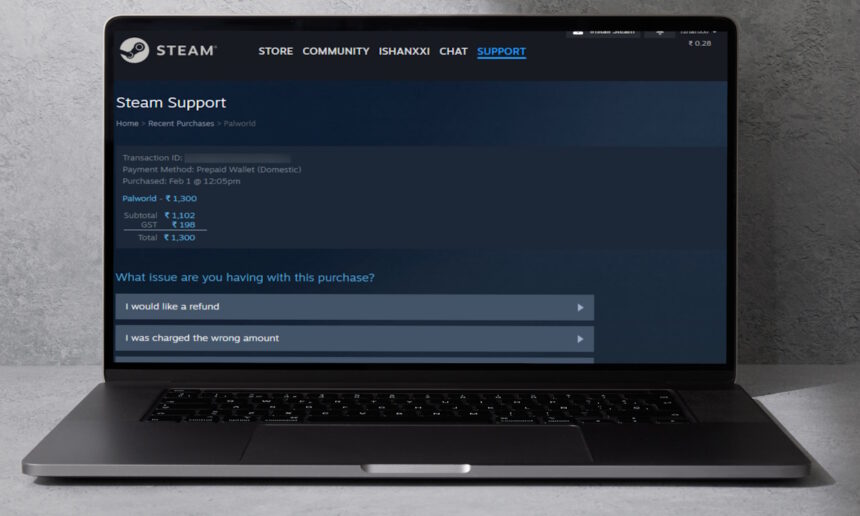
  1. Log In: Visit the Steam Help website and sign in to your account.

  2. Find Purchases: Click on Purchases to see a list of your games. Find the game (or downloadable content) you want to refund.

  3. Select a Reason: You’ll need to pick a reason for your refund. This could be something like “I would like a refund” or anything that fits your situation.

  4. Request the Refund: Click on the option that says I’d like to request a refund.

  5. Choose Your Refund Method: Decide whether you want the money back to your original payment method or if you’d like it added to your Steam wallet.

  6. Submit Your Request: Once you’ve filled everything out, click the Submit Request button!

After you submit, you’ll get an email confirming that Steam has received your request. They usually take about 7 working days to process it, so hold tight!

How to Check If Your Game Is Refundable

Not all purchases are eligible for refunds. If you want to find out if the game you bought can be refunded, just repeat the first step above to look for the game in your purchases list. If it doesn’t show up there, then it’s not eligible for a refund.

You can also view your complete purchase history if you want to keep tabs on everything you’ve bought.

Know the Refund Rules

Here are some important rules to remember about refunds:

  • Time Limit: You can request a refund within 14 days of making the purchase, but you also need to have played the game for less than 2 hours.
  • DLC: Downloadable content can also be refunded within 14 days if you haven’t used it for more than 2 hours.
  • In-Game Purchases: If you bought something within a game, you have 48 hours to request a refund, as long as it hasn’t been used or changed.
  • Ban Consequences: If you receive a VAC Ban (which usually happens for cheating), you can’t get a refund.

Wrap-Up

Steam is pretty chill about refund requests, but they still have these basic rules to make sure everything stays fair. Remember, even if your purchase doesn’t exactly meet the refund criteria, you can still ask—they might still help you out!

What’s the craziest game you accidentally bought on Steam? Share your story in the comments below! And always remember to enjoy gaming, but balance it with other activities too!

Happy gaming! 🎮

You Might Also Like

Unlock the Secrets: Your Guide to Today’s NYT Connections Game (February 27, 2025)!

Mastering Dune Awakening: Your Ultimate Base Building Guide – Top Spots and Pro Tips!

Mastering the Art of Toilet Fishing in Fisch: Tips for Young Gamers!

Unlocking the Draco Race in Blox Fruits: A Complete Guide for Gamers!

Unlocking the Secrets: Exciting New Seeds in Grow a Garden Night Pack!

TAGGED:#Steam
Share This Article
Facebook X Email Print
Leave a Comment Leave a Comment

Leave a Reply Cancel reply

Your email address will not be published. Required fields are marked *

New Releases

- Advertisement -
Ad image

Trending Stories

Mastering Wolf Skills: A Guide to Taming Wolves in Dead Rails!
Games

Mastering Wolf Skills: A Guide to Taming Wolves in Dead Rails!

April 16, 2025
Unlocking the Secrets of Fortnite: Explore Every Epic Landing Spot in Chapter 1 Season 2!
Games

Unlocking the Secrets of Fortnite: Explore Every Epic Landing Spot in Chapter 1 Season 2!

January 29, 2025
Unlocking the Challenge: Fun Hints and Solutions for the January 4, 2025 Gaming Quest!
Games

Unlocking the Mystery: Hints and Answers for Your March 10, 2025 Gaming Challenge!

March 9, 2025
Discover What’s New: Exciting Fortnite Map Changes in Chapter 6, Season 2!
Games

Unlocking Epic Fortnite Moments: Tips to Level Up Your Game!

February 21, 2025
Unlocking HSR 3.0: Discover All the Living Flame Locations in Georios!
Games

Unlocking HSR 3.0: Discover All the Living Flame Locations in Georios!

January 14, 2025
Unlocking Wordle #1353: Hints and Answer for March 3, 2025!
Games

Unlocking Today’s Wordle Challenge: Hints and Answer for March 22, 2025!

March 21, 2025

Always Stay Up to Date

Subscribe to our newsletter to get our newest articles instantly!

Follow US on Social Media

Facebook Youtube Steam Twitch Unity

© 2025 Thegamnersanctuary.net - All Rights Reserved. YS

The Gamer Sanctuary

More from Foxiz

  • Job @FoxizMagazine
  • Privacy Policy
  • Advertise
  • Subscribe
Welcome Back!

Sign in to your account

Username or Email Address
Password

Lost your password?