• TRENDING
  • The Skywalker Saga
  • Elden Ring Boss
  • Sonic Frontiers PS 5
  • Deathloop Gameplay
  • CONTACT US
SUBSCRIBE
The Gamer Sanctuary
  • Home
  • Games
    • Pokemon go
    • Fortnite
    • Fisch
    • Honkai Star Rail
    • Marvel Rivals
    • Minecraft
    • ROBLOX
    • Wordle
    • Valorant
    • NYT Strands
    • NYT Connections
  • Xbox
    Unlock Epic Adventures: May 2025 Codes for Anime Run Kingdom!
    Games

    Unlock Epic Adventures: May 2025 Codes for Anime Run Kingdom!

    TGS TGS May 28, 2025
    Epic All-Night Egg Pets: Discover the Lunar Update in Grow a Garden!
    Games

    Epic All-Night Egg Pets: Discover the Lunar Update in Grow a Garden!

    TGS May 10, 2025
    Unlock the Speed Boost: How to Get Glimmersuit Boots in Fisch!
    Games

    Unlock the Speed Boost: How to Get Glimmersuit Boots in Fisch!

    TGS March 8, 2025
  • Bookmarks
Reading: Mastering Structure Moves: Tips for Success in RuneScape Dragonwilds!
Share
The Gamer SanctuaryThe Gamer Sanctuary
Font ResizerAa
  • Adventure
Search
  • Home
    • Home 5
  • Categories
  • Bookmarks
    • My Bookmarks
  • More Foxiz
    • Blog Index
    • Sitemap
Have an existing account? Sign In
Follow US
© Foxiz News Network. Ruby Design Company. All Rights Reserved.
Games

Mastering Structure Moves: Tips for Success in RuneScape Dragonwilds!

TGS
Last updated: April 16, 2025 10:00 am
TGS
Share
4 Min Read
Mastering Structure Moves: Tips for Success in RuneScape Dragonwilds!
SHARE

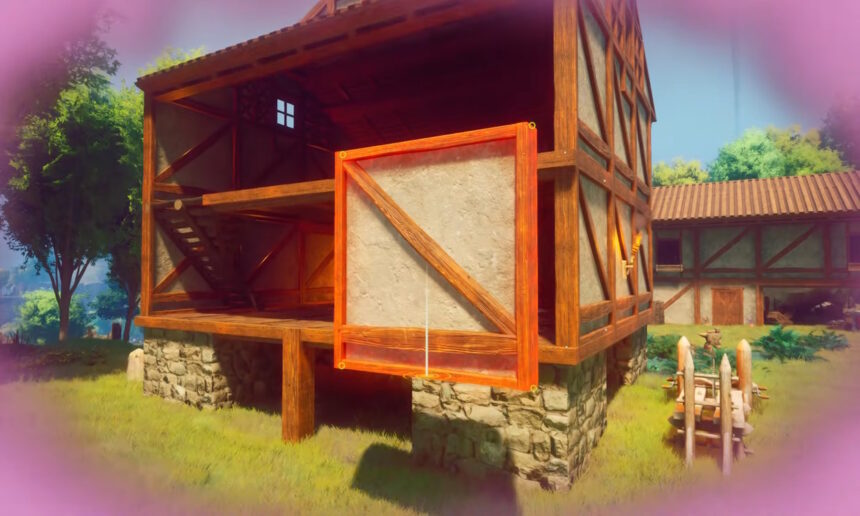
Exploring Building and Repairing in RuneScape Dragonwilds

If you love survival games, one of the most exciting parts is building your own creations! Whether you’re crafting a cozy home or a super fortress, there’s always that moment when you realize your creation isn’t quite what you wanted. Don’t worry—if you’re playing RuneScape Dragonwilds, you have the option to start fresh! Let’s dive into how you can move, delete, and repair your structures in the game, so you’re always building just the way you like.

Can You Move Structures in RuneScape Dragonwilds?

In short, no, you can’t move your buildings with just a single click. But here’s the good news: you can delete any structure that you’ve built! When you delete something, you get back all the resources you used to build it. So, if you used four pieces of wood to create your structure, you’ll get those four pieces back after you delete it. Pretty handy, right?

How to Delete Structures in RuneScape Dragonwilds

Deleting and rebuilding your structures is the way to go if you want to change their location. Here’s a simple step-by-step guide on how to do it:

  1. Press the B key to open the build menu.
  2. Hit the T key to turn on Repair Mode.
  3. Use your mouse to point at the structure you want to delete.
  4. Press the middle mouse button to delete it.
  5. Remember, when you delete a structure, the resources will drop on the ground, so make sure to gather them back up!

Repairing Structures in RuneScape Dragonwilds

So, what if your structure gets damaged? No worries! You can easily repair it whenever you want. Here’s how you can do it:

  1. Go to the build menu (press B).
  2. Turn on Repair Mode by pressing T.
  3. Point at the damaged structure you want to fix.
  4. Press the left mouse button to repair it!

Just keep in mind that you will need some resources to repair it, but they won’t be as much as you need for a full rebuild.
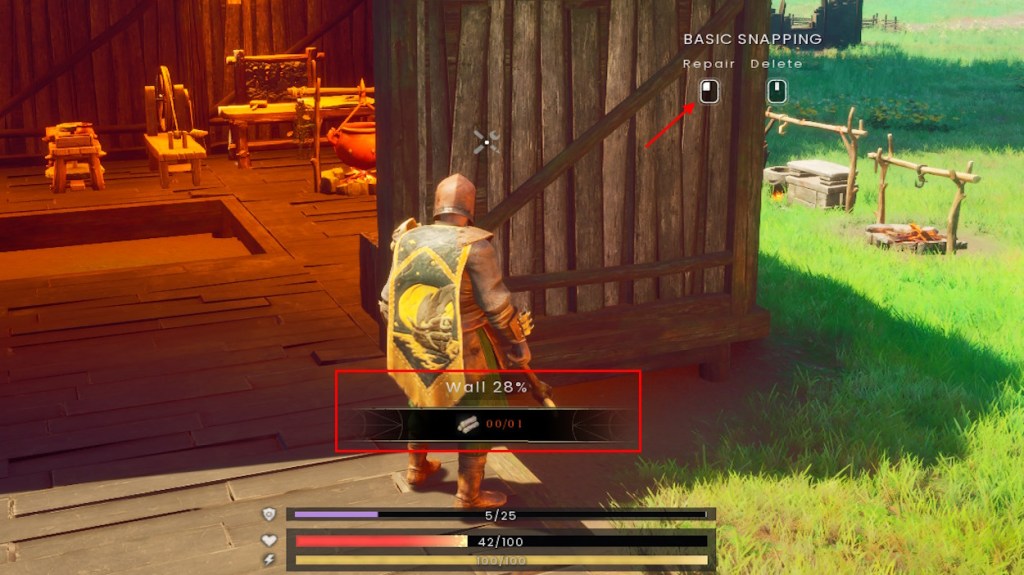
Repairing in RuneScape Dragonwilds

So there you have it—whether you’re constructing from scratch or fixing what you’ve already made, RuneScape Dragonwilds has you covered!

Why is Gaming Beneficial?

Playing games like RuneScape Dragonwilds isn’t just fun; it can help you develop some important skills! When you build and strategize, you’re practicing problem-solving and creative thinking. Plus, if you’re playing with friends, you’ll learn about teamwork and communication. Gamers often work together to share resources and ideas, which can help you make great friendships!

Have you started playing RuneScape Dragonwilds yet? If you have, why not invite some friends to join? You can learn together, share tips, and have a blast while you build and explore! Share your thoughts in the comments below—what’s your favorite thing to build in the game? Have you encountered any tricky challenges? We’d love to hear your stories!

Happy gaming, everyone! 🌟

You Might Also Like

Unlocking NYT Connections: Tips and Answers for June 15, 2025!

Clair Obscur Expedition 33: Find All the Festival Tokens and Level Up Your Game!

Is Your Favorite GTA Vice City Character Coming Back in GTA 6?

Level Up Your Vocabulary: Master Wordle in Just 4 Simple Steps!

Unlocking Fortnite Fun: What’s a Gift Card and How Can You Use It?

Share This Article
Facebook X Email Print
Leave a Comment Leave a Comment

Leave a Reply Cancel reply

Your email address will not be published. Required fields are marked *

New Releases

- Advertisement -
Ad image

Trending Stories

Unlocking the Cool Cape: Your Guide to Getting Common Capes in Minecraft!
Games

Unlocking the Cool Cape: Your Guide to Getting Common Capes in Minecraft!

May 7, 2025
Level Up Your Garden: Create Your Own Berry Blusher Sprinkler!
Games

Level Up Your Garden: Create Your Own Berry Blusher Sprinkler!

June 15, 2025
Unlocking Wordle: Your Go-To Hints and the Answer for Game #1383 on April 2, 2025!
Games

Master Today’s Wordle Challenge: Hints and Answer for #1407 (April 26, 2025)!

April 25, 2025
Top Sniper Setups to Dominate in Warzone Season 3 Reloaded!
Games

Top Sniper Setups to Dominate in Warzone Season 3 Reloaded!

May 1, 2025
"Crack the Code! Hints and Answers for June 3, 2025 – NYT Connections Unlocked!"
Games

Unlocking NYT Connections: Your Ultimate Guide to Hints and Answers for June 18, 2025!

June 18, 2025
Unlocking the Challenge: Fun Hints and Solutions for the January 4, 2025 Gaming Quest!
Games

Game On: Your Ultimate Guide to Puzzle Hints and Answers for February 21, 2025!

February 20, 2025

Always Stay Up to Date

Subscribe to our newsletter to get our newest articles instantly!
[mc4wp_form]

Follow US on Social Media

Facebook Youtube Steam Twitch Unity

© 2025 Thegamnersanctuary.net - All Rights Reserved. YS

The Gamer Sanctuary

More from Foxiz

  • Job @FoxizMagazine
  • Privacy Policy
  • Advertise
  • Subscribe
Welcome Back!

Sign in to your account

Username or Email Address
Password

Lost your password?