• TRENDING
  • The Skywalker Saga
  • Elden Ring Boss
  • Sonic Frontiers PS 5
  • Deathloop Gameplay
  • CONTACT US
SUBSCRIBE
The Gamer Sanctuary
  • Home
  • Games
    • Pokemon go
    • Fortnite
    • Fisch
    • Honkai Star Rail
    • Marvel Rivals
    • Minecraft
    • ROBLOX
    • Wordle
    • Valorant
    • NYT Strands
    • NYT Connections
  • Xbox
    Unlocking the Secrets: How to Find the Kitsune Fruit in Blox Fruits!
    Games

    Unlocking the Secrets: How to Find the Kitsune Fruit in Blox Fruits!

    TGS TGS January 21, 2025
    Getting It Right in Elden Ring: What You Need to Know About Nightreign Leave Penalties!
    Games

    Getting It Right in Elden Ring: What You Need to Know About Nightreign Leave Penalties!

    TGS June 2, 2025
    Unlock Your Adventure: Climb & Jump Tower Codes for April 2025!
    Games

    Unlock Your Adventure: Climb & Jump Tower Codes for April 2025!

    TGS April 29, 2025
  • Bookmarks
Reading: Can Your PC Handle Doom? Find Out If You’re Ready to Game in the Dark Ages!
Share
The Gamer SanctuaryThe Gamer Sanctuary
Font ResizerAa
  • Adventure
Search
  • Home
    • Home 5
  • Categories
  • Bookmarks
    • My Bookmarks
  • More Foxiz
    • Blog Index
    • Sitemap
Have an existing account? Sign In
Follow US
© Foxiz News Network. Ruby Design Company. All Rights Reserved.
Games

Can Your PC Handle Doom? Find Out If You’re Ready to Game in the Dark Ages!

TGS
Last updated: January 24, 2025 3:00 am
TGS
Share
4 Min Read
Can Your PC Handle Doom? Find Out If You’re Ready to Game in the Dark Ages!
SHARE

Get Ready to Game: Doom: The Dark Ages System Requirements

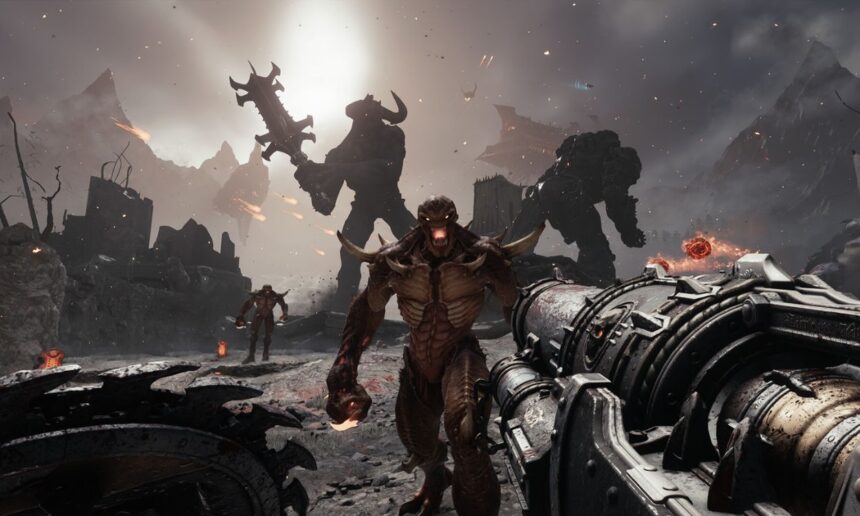
Hey there, gamers! Are you excited about diving into the thrilling world of Doom: The Dark Ages? Before you jump into the action, let’s make sure your gaming setup can handle it. In this article, we’ll go through what you need to run the game smoothly, so you can focus on conquering those demon foes!

What Do You Need for Doom?

First things first, this game has some specific requirements for your computer. Here’s a quick overview of what you’ll need:

  • Operating System: Windows 10 or 11 (only 64-bit versions)
  • Storage: You must use an NVMe SSD and have at least 100GB of free space. (Don’t worry, we’ll explain what that is!)
  • Graphics: Your PC should be compatible with DirectX 12.

Why Is an NVMe SSD Important?

An NVMe SSD is a super-fast type of storage that helps games load faster, so you’re not left waiting. Think of it like the difference between running and jogging—you want to get to the action quickly!

Minimum and Recommended Requirements

If you’re itching to jump in, here’s what you’ll need at a minimum to play comfortably:

Minimum Requirements:

  • CPU: AMD Ryzen 7 3700X or Intel i7 10700K (This is like the brain of your computer, and it needs to be pretty strong!)
  • RAM: 16GB
  • Graphics Card (GPU): At least an 8GB ray-tracing capable card like the RTX 2060 SUPER. (Ray tracing makes the game look more realistic, like shining lights and shadows.)
  • Performance: You’ll be looking at 1080p (which is pretty clear!) at 60 frames per second on lower settings.

Recommended Requirements:

For a more epic experience, here’s what’s best to have:

  • CPU: AMD Ryzen 7 5700X or Intel i7 12700K
  • RAM: 32GB
  • GPU: A 10GB ray-tracing capable card, like the RTX 3080.
  • Performance: Aim for 1440p (even clearer!) at 60 frames per second on higher settings.

Super Ultra Specs for the Best Experience

If you really want to see everything in stunning detail, here’s what you’ll need:

  • CPU: Intel Core i7-12700K
  • RAM: 32GB
  • GPU: A powerful 16GB ray-tracing capable card.
  • Performance: 2160p at 60 frames per second on ultra settings (the clearest possible).

Why These Specs Matter

Doom: The Dark Ages is going to push your computer to its limits, which is why the specifications are quite demanding. But don’t worry—if your PC doesn’t meet these requirements, you can still play on next-gen gaming consoles!

Upgrade Time!

If you’re unsure whether your computer is up for the challenge, check out your specs and see if they match up. If you find out you need upgrades, you have until May 15, 2025 to get everything ready!

Your Turn!

So, what’s your favorite video game, and what makes it special for you? Have you ever had to upgrade your gaming setup for a new game? Share your thoughts or any cool stories in the comments below!

Now that you’re equipped with all this info, we hope you’re ready to gear up and get into the action of Doom: The Dark Ages. Happy gaming!

You Might Also Like

Mastering Fortnite on Nintendo Switch: A Gamer’s Guide for Teens!

Unlocking the Secrets: How to Capture the Awesome Magma Leviathan in Fisch!

Unlocking Fun: The Ultimate Guide to Mall Game Codes (May 2025)

Unlocking the Secrets: Mastering the Yumemizuki Mizuki Build in Genshin Impact!

Unlock Today’s Wordle Challenge: Hints and the Answer for #1475 (July 3, 2025)

Share This Article
Facebook X Email Print
Leave a Comment Leave a Comment

Leave a Reply Cancel reply

Your email address will not be published. Required fields are marked *

New Releases

- Advertisement -
Ad image

Trending Stories

Unlocking Secret Night Vision Goggles in Beaks: Your Ultimate Guide!
Games

Unlocking Secret Night Vision Goggles in Beaks: Your Ultimate Guide!

April 19, 2025
Ready to Play Elden Ring? Check Out These System Requirements You’ll Need!
Games

Ready to Play Elden Ring? Check Out These System Requirements You’ll Need!

April 28, 2025
Unlocking the Latest in Minecraft: New Features, Realm Updates, and the Cool Locator Bar!
Games

Unlocking the Latest in Minecraft: New Features, Realm Updates, and the Cool Locator Bar!

April 22, 2025
Crack the Code: Your Ultimate Guide to Wordle #1300 – Tips and Tricks Inside!
Games

Unlock Today’s Wordle Challenge: Hints and Answers for January 10, 2025!

January 10, 2025
Unlocking HSR 3.0: Discover All the Living Flame Locations in Georios!
Games

Unlocking HSR 3.0: Discover All the Living Flame Locations in Georios!

January 14, 2025

Squash the ‘Failed to Find Installed Product’ Error in Minecraft: A Gamer’s Guide to Getting Back in the Game!

March 26, 2025

Always Stay Up to Date

Subscribe to our newsletter to get our newest articles instantly!
[mc4wp_form]

Follow US on Social Media

Facebook Youtube Steam Twitch Unity

© 2025 Thegamnersanctuary.net - All Rights Reserved. YS

The Gamer Sanctuary

More from Foxiz

  • Job @FoxizMagazine
  • Privacy Policy
  • Advertise
  • Subscribe
Welcome Back!

Sign in to your account

Username or Email Address
Password

Lost your password?